Posts

Technologists: one thing you must know if you use logseq with GitHub

Image
Like many technologists, I use Personal Management Tools to manage information overload. I've been using technology to help me keep track of complex technical material since the 1980s. These days, my favourite tool is logseq . You can use logseq to capture, connect and create technical information. Over the last couple of years I've built up a large, heavily linked knowledge graph - a second brain filled with information and ideas. It's worked well for me but this week I hit a pitfall. Using logseq with GitHub If you use logseq as your PKM system you may be using GitHub to back up and version your knowledge graphs. Logseq has great GitHub integration. Because of that, many users have adopted GitHub as a way of making sure their second brain is secure and easy to access from anywhere they want. If you are using logseq with GitHub, beware - there's a potential pitfall lurking! A trap to avoid Logseq has great support for PDFs and mp4 videos. You c...
Three strategies to manage Technology Overload

Image
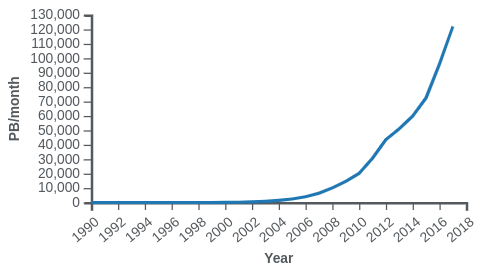
If you're reading this you're probably a knowledge worker . Your value lies in the knowledge at your disposal and your ability to apply it. There are daily advances in every field of technology, and you are subjected to a flood of new knowledge competing for your attention. It's easy to feel overwhelmed. In this article, you'll read a brief introduction to the flood of information overload and its causes. see three strategies you can use to cope with that flood. see how to avoid getting overwhelmed by the range of tools - otherwise the cure will be worse than the disease! But first - what's the problem? What's the problem? The Explosion of Information Edholm's Law states that Internet traffic now follows the same pace of growth as Moore's Law. That poses a huge problem for knowledge workers. Here's a picture of the problem: The knowledge gap If that worries you, you're not alone. Professor Eddie Obeng explores the Kno...

APL and Python go head-to-head

Markdown is great, but... I've encountered a problem. I use Markdown a lot. Since it's pure text-based markup, it's handled well by Git and GitHub. That helps me keep track of versions, and it simplifies text merges if I'm collaborating on a writing project. A lot of my writing features Python code, and I like to work on the code and the article in the same editor. Fortunately there's great support for editing and displaying Markdown in both PyCharm and VS Code . Markdown is supported by lots of FOSS tools which make it easy to convert between Markdown and other formats. I regularly use pandoc to turn Markdown in to pdfs and to publish on Leanpub , and I use the markdown package to convert Markdown files into HTML which I can paste into Blogger. (Pandoc can create HTML but the output is not directly usable in Blogger.) So I have a problem. Much of markdown is standardised but the pandoc and markdown programs handle code blocks differently. ...

Let the computer test your Python GUI application

Image
Let the computer test your Python GUI application In this article you’ll see how easy it is to write automated tests for Graphical User Interfaces (GUIs) written using the brilliant guizero Python library. I’ll start with a horror story which explains why I’m so keen on automated GUI tests. Next I’ll describe an application that I’m using as an example. The code for the app and the test are available on GitHub; the link is in the resources section at the end of this post. After that, I’ll show how the tests are built up and describe how they enabled me to find and fix a bug. A personal horror story A couple of years ago I presented a Quiz Runner application to an audience of Digital Makers. The Quiz Runner application used a workstation to manage the Quiz. Quiz Contestants used micro:bits to ‘buzz’ in when they thought they knew an answer. The micro:bits communicated via radio using the micro:bit’s built-in radio capability, and everything (workstation and micro:bits) was pro...

Choosing a Python library

You’re working on a Python project, and you realise the next thing to do is a bit tricky. You don’t want to reinvent the wheel if you don’t have to. You wonder: has someone solved this problem before? The first place to look is the Python Standard Library . One of Python’s great strengths is that it comes with batteries included; there are well-documented, tried and tested libraries to do all sorts of useful things. No luck ? Turn to GitHub for help - it usually can! Most of the libraries I use are hosted on GitHub. Sometimes you’ll just find one candidate library; sometimes there will be more than one. You’ll need to decide if any fit the bill, and which looks best. As we’ll see, GitHub can tell you a lot about the quality of the project. Here are the things I like to ask about a library I’m considering. I’ve illustrated the checklist using the guizero project as an example, since I use it a lot and it ticks all the boxes. Does it have good documentation? Is the inten...

Time to retire my Rapsberry Pi Tensorflow Docker project?

I need your advice! Six years ago I did some experiments using TensorFlow on the Raspberry Pi.   It takes hours to compile TensorFlow on the Pi, and when I started the Pi platform wasn't officially supported. Sam Abrahams found his way thorough the rather scary compilation process, and I used his wheel to build a Docker image for the Pi that contained TensorFlow and Jupyter. That made it easy for users to experiment by installing Docker and then running the image. I was a bit anxious, as that was my first docker project, but it proved very popular. Things have change a lot since then. For a while, the TensorFlow team offered official support for the Raspberry Pi, though that has now stopped. You can still download a wheel but it's very out-of-date. I recently discovered Leigh Johnson's post on how to install full TensorFlow on the Pi. It's slightly out-of-date but the instructions on how to compile it yourself probably still work. Most Pi-based AI projects now use Tens...

Timings and Code for Spiking Neural Networks with JAX

Image
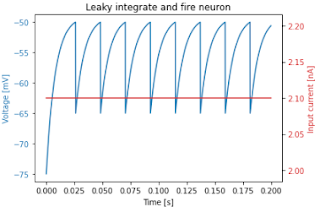
 I've been encouraged to flesh out my earlier posts about JAX to support  27DaysOfJAX . I've written simulations of a Leaky Integrate and Fire Neuron in *Plowman's* (pure) Python, Python + numpy, and Python + JAX. Here's a plot of a 2000-step simulation for a single neuron: Plot for a single neuron The speedups using Python, Jax and the JAX jit compiler are dramatic. Pure Python can simulate a single step for a single neuron in roughly 0.25 µs. so 1,000,000 neurons would take about 0.25 seconds. numpy can simulate a single step for 1,000,000 neurons in 13.7 ms . Python, JAX + JAX's jit compilation can simulate a single step for 1,000,000 neurons in 75 µs . Here's the core code for each version. # Pure Python def step(v, tr, injected_current): spiking = False if tr > 0: next_v = reset_voltage tr = tr - 1 elif v > threshold: next_v = reset_voltage tr = int(refactory_period / dt) spiking = True else...