Posts

Showing posts with the label Deep Learning

Benchmarking process for TF-TRT, and a workaround for the Coral USB Accelerator

Image
A couple of days ago I published some benchmarking results running a TF-TRT model on the Pi and Jetson Nano. I said I'd write up the benchmarking process. You'll find the details below. The code I used is on GitHub . I've also managed to get a Coral USB Accelerator running with a Raspberry Pi 4. I encountered a minor problem, and I have explained my simple but very hacky workaround at the end of the post. TensorFlow and TF-TRT benchmarks Setup The process  was based on this excellent article , written by Chengwei Zhang . On my workstation I started by following Chengwei Zhang's recipe. I trained the model on my workstation using and then copied trt_graph.pb from my workstation to the Pi 4. On the Raspberry Pi 4 I used a virtual environment created with pipenv , and installed jupyter and pillow . I downloaded and installed this unofficial wheel . I tried to run step2.ipynb but encountered an import error. This turned out to be an old TensorFl...

An excellent course for Jetson Nano owners

Image
Jetson Nano Regular readers will know than I'm a keen Jetson Nano owner. Recently I posted a series about how to started with the computer but NVIDIA have now published an excellent course,  ' Getting Started with the Jetson Nano ', which is  free for members of the NVIDIA developers' program. The course comes with a pre-built image which can run the Nano in headless mode. That's very useful - I had to buy a new monitor to get going, as none of my old monitors had native HDMI support. The image provide with the course just needs a Nano and a Laptop or Desktop computer with a USB port. The course is a great introduction to deep learning with a GPU. Once you've completed it you may want to delve deeper; there are lots of excellent Deep Learning courses available on-line, and many of them use Google's Colab for practical sessions. Google Colab gives you free access to top-of-the range NVIDIA hardware, and if you want to run your trained models l...

AL/DL explorers - two great, free resources for you

Image
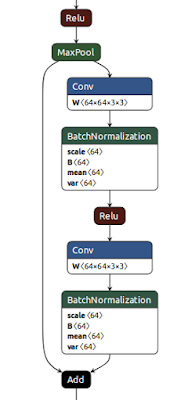
I'd like to share two really useful free resources for anyone exploring Artificial Intelligence and Deep Learning. Netron The first is netron - an Open Source tool for displaying Deep Learning models. The image on the right is a small part of netron's display of  resnet-18. Netron covers a wide range of saved model formats is really easy to install is MIT licensed  is implemented in JavaScript and  can be installed and invoked from Python. Computer Vision Resources The second find is Joshua Li's 'Jumble of Computer Vision' - a curated list of papers and blog posts about Computer Vision topics. It's going to keep me reading for weeks to come :) Many thanks to Joshua for making this available.

Getting Started with the Jetson Nano - part 4

Image
I'm amazed at how much the Nano can do on its own, but there are times when it needs some help. A frustrating problem... Some deep learning models are too large to train on the Nano. Others need so much data that training times on the Nano would be prohibitive. Today's post shows you one simple solution. ... and a simple solution In the previous tutorial , you went through five main steps to deploy the TensorFlow model: Get training data Define the model Train the model Test the model Use the model to classify unseen data Here's the key idea: you don't have to do all those steps on the same computer . Saving and Loading Keras Models   The Keras interface to TensorFlow makes it very easy to export a trained model to a file . That file contains information about the way the model is structured, and it also contains the weights which were set as the model learned from the training data. That's all you need to recreate a usable copy of th...

Getting started with the Jetson Nano - part 3

Image
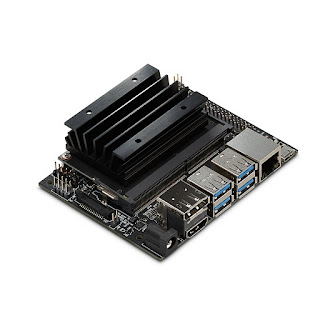
Jetson Nano image courtesy of NVIDIA/Pimoroni In part 2 of this series you prepared your Jetson Nano for software installation. In this part you'll install Jupyter Notebook, Jupyter lab, TensorFlow and some other software that is needed to run the first TensorFlow notebook. Once started, you can leave the software installation to run; it takes about an hour on a Nano in 10W power mode. It probably takes a little longer if you're using a 2.5A supply. There's a final manual stage which takes a couple of minutes. When that's complete you'll be able to work through the TensorFlow example, training a Neural Net to recognise item images from a Fashion database and then testing it in previously unseen images. Here's what you'll do, in a little more detail. Installing the software Open a terminal window on the Nano  (A short-cut,  crl-alt-T should do it). You'll be in your home directory; type git clone https://github.com/romilly/nano.g...

Getting Started with the Jetson Nano - Part 2

Image
Learning with the Nano This is the second in a series about getting started with the Jetson Nano. Part 1 is here . It's taken a while, but I now have a simple, repeatable set-up process for installing and running TensorFlow on the Jetson Nano using Jupyter Notebooks. It's simple and repeatable but slow . Jupyter Notebook saves a lot of time and angst once it's available but it takes a while to install. Fortunately I now have a script that automates the installation so you can go away and drink a coffee while the installation runs. Before you can install the software, though, you need to complete the installation of Ubuntu. That's what this post covers. My first post about the Nano described the hardware you need and pointed you to instructions that explain how to prepare your SD card. Once you've got your hardware and have prepared the SD card, it's time to fire up the Nano. Getting ready Plug in the HDMI cable, the Ethernet cable, the keyboa...

Getting Started with the Jetson Nano

Image
Note: The approach outlined in this series will still work, but there is an interesting official alternative. The Jetson team at NVIDIA have created an excellent self-study course , supported by a downloadable image which is similar to the one used in these articles. To use the NVIDIA image, you'll need: Jetson Nano Developer Kit Computer with Internet Access and SD card port microSD Memory Card (32GB UHS-I minimum) USB cable (Micro-B to Type-A) If you just want to use the course image, you can get by with those items and a 5V 2.5A power supply but to take the course you will need compatible 5V 4A Power Supply with 2.1mm DC barrel connector 2-pin jumper compatible camera such as Logitech C270 Webcam or Raspberry Pi Camera Module v2 You will not need a monitor, mouse or keyboard . To learn where to find the DLI course image, and how to get started with it, you should enroll on the course . It's free, takes about 8 hours, and will give you an excellent ...