Posts

Totem - the Meccano replacement for 21C Makers

Image
Totem kit Totem and Pimoroni have combined forces to make my Christmas very early this year! Earlier this month I discovered Totem Maker kits . I bought a 2 wheel drive bluetooth robot and was delighted at how easy it was to assemble and drive. Totem are based on Vilnius, but my first order arrived quickly. I have a couple more robot designs in the pipeline and decided to use one of the larger Totem kits for prototyping them. Some of the kits are now stocked by Pimoroni , so I ordered one, along with the extra components I needed for the next robot. The kit appeared the next day. Instructions   The Totem kit is beautifully packaged and the instructions are outstanding: visually attractive, clear and easy to follow. I'll report on progress as I work on the robot design. I'll be showing the end result at next month's Margate Raspberry Jam and at the London Arduino Maker day in March. I'll post more details here as they become available. Jetson Nano U...
Pimoroni Explorer Hat Tricks

Image
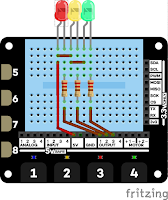
Yesterday I talked about my plans for the Pimoroni Explorer HAT. I've started the GitHub repository for the code from Explorer Hat Tricks. That's the ebook I'm writing for users of the Explorer HAT, HAT Pro and pHAT. At present there are just a few examples and a single project, but I only started yesterday :) I'll post here and tweet ( @rareblog ) as more code becomes available. Leanpub  I'm developing the ebook on Leanpub , a publishing platform. Leanpub is good for authors and great for readers. Readers like it because they get a chance to see a sample free lifetime updates for every book in their library, paid-for or free a 45-day money-back guarantee, and DRM-free content in pdf, mobi and epub formats.   Try the code out You'll need a Raspberry Pi with 40-pin header (zero, 2, 3 or 4) running Raspbian Buster a Pimoroni Explorer HAT Pro . Most of the code will also work on the original HAT or pHAT, but some will need the Pro f...

Raspberry Pi fun with the Pimoroni Explorer Hat

Image
Pimoroni Explorer Hat Pro I love the pirate crew at Pimoroni more than ever! Last week Pimoroni ran a series of competitions on twitter. The prizes were gift tokens and I was lucky enough to win one. My Pirate booty included an Explorer Hat Pro and a parts kit . I've been playing with them ever since. The Hat lets you protoype Raspberry Pi projects in minutes. You don't need to do any soldering and the Python library is quick to install, well written and commented and really easy to use. One good turn deserves another I suspect that beginners would welcome more  'how-to' guides, and I'm putting some together. I plan to publish open source code on GitHub, and to publish detailed instructions in a low-cost e-book. If you've got suggestions or ideas for content that you'd be happy for me to use,  let me know in a comment, or tweet your ideas to @rareblog on Twitter.

Docker build for TensorFlow 1.14 + Jupyter for Rasapbian Buster on Raspberry Pi 4B

Image
I've updated an old Docker build to create a Docker image for Raspberry Pi  Buster. It contains Katsuya Hyodo's TensorFlow wheel which has TensorFlow Lite enabled. The image contains Jupyter, so you can connect to the running image from anywhere on your network and run TensorFlow notebooks on the Pi. This is highly experimental - don't use it for anything important :) Once I've done some tidying up (and a lot more testing!) I'll put the image up pon DockerHub. To build/run it you need the Docker nightly build. I installed it by invoking curl -fsSL get.docker.com | CHANNEL=nightly sh If you find any problems please raise an issue on GitHub.  

Benchmarking process for TF-TRT, and a workaround for the Coral USB Accelerator

Image
A couple of days ago I published some benchmarking results running a TF-TRT model on the Pi and Jetson Nano. I said I'd write up the benchmarking process. You'll find the details below. The code I used is on GitHub . I've also managed to get a Coral USB Accelerator running with a Raspberry Pi 4. I encountered a minor problem, and I have explained my simple but very hacky workaround at the end of the post. TensorFlow and TF-TRT benchmarks Setup The process  was based on this excellent article , written by Chengwei Zhang . On my workstation I started by following Chengwei Zhang's recipe. I trained the model on my workstation using and then copied trt_graph.pb from my workstation to the Pi 4. On the Raspberry Pi 4 I used a virtual environment created with pipenv , and installed jupyter and pillow . I downloaded and installed this unofficial wheel . I tried to run step2.ipynb but encountered an import error. This turned out to be an old TensorFl...

Benchmarking TF-TRT on the Raspberry Pi and Jetson Nano

Image
Trying to choose between the Pi 4B and the Jetson Nano for a Deep Learning project? I recently posted some results from benchmarks I ran training and running TensorFlow networks on the Raspberry Pi 4 and Jetson Nano. They generated a lot of interest, but some readers questioned their relevance. They were'n interested in training networks on edge devices. Most people expect to train on higher-power hardware and then deploy the trained networks on  the Pi and Nano. If they use TensorFlow for training, they have are several choices for deployment: Standard TensorFlow TensorFlow Lite TF-TRT (a TensorFlow wrapper around NVIDIA's TensorRT, or TRT) Raw TensorRT In this post I'll focus on timing Standard TensorFlow and TF-TRT. In a later post I plan to cover TensorFlow Lite on the Pi with and without accelerators like the Coral EDGE TPU coprocessor and the Intel Compute Stick. I've run a number of benchmarks, and the results have been much as I expected. I d...

Training ANNs on the Raspberry Pi 4 and Jetson Nano

Image
There have been several benchmarks published comparing performance of the Raspberry Pi and Jetson Nano. They suggest there is little to chose between them when running Deep Learning tasks. I'm sure the results have been accurately reported, but I found them surprising. Don't get me wrong. I love the Pi 4, and am very happy with the two I've been using. The Pi 4 is significantly faster than its predecessors, but... The Jetson Nano has a powerful GPU that's optimised for many of the operations used by Artificial Neural Networks (ANNs). I'd expect the Nano to significantly outperform the Pi running ANNs. How can this be? I think I've identified reasons for the surprising results. At least one benchmark appears to have tested the Nano in 5W power mode. I'm not 100% certain, as the author has not responded to several enquiries, but the article talks about the difficulty in finding a 4A USB supply. That suggests that the author is not entirely...