Posts

The Pimoroni Presto - prefect form, fantastic features

Image
I've just unboxed a Pimoroni Presto and it is the most beautiful hardware I've ever seen. The front is clean and lean; the display is crisp with lots of room.  On the right is a low-res image of the screen; the full res display is even sharper.  It's perfect for MARPLE, my current project. I'm building an APL interpreter and development environment. MARPLE runs in workstations, but to my surprise and delight it also runs well on the Raspberry Pi Pico2, the chip that powers the Presto.  The back of the Presto is packed with features; an SD card slot, two QW/ST ports for I2C connection, a piezo buzzer, a battery connector, reset and boot buttons and backlighting LEDs. There are extra accessories in the starter kit, but I've work to do before I get to use them. I've got my APL character set working, but tomorrow I'll start work on installing the interpreter. I need the SD card slot for saving code, and I want to add an interface to I2C. The Presto is exactly wh...

I2C and SPI - what would you like to know?

Image
You can find more about I2C, SPI, Raspberry Pi and Pico on the free RAREBlog stack . I'll be posting all new RAREblog content on that stack. I will keep old content here, since some of these pages still get inbound traffic from links. My goal for the next few months is to post a full article each week, but I'm also sharing work in progress as substack notes. You can follow those without signing up for the full substack experience. In the current project, I'm getting a monochrome display to show how the current through an LED varies with voltage. I'm nearly there: I expect to complete the project in the next day or so. Here's the display; the video below shows the breadboard with the Pico, the LED and additional circuitry. Here's the latest plot; it's generated on my workstation from a csv file, but I should soon have a version on the OLED display!   Remember to follow the new version of RAREblog if you want to follow my progress!    

Coding with Cascade

Image
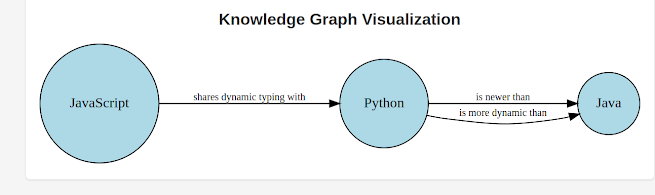
Using SVG for interactive knowledge graphs A while ago I built an interactive knowledge graph visualiser using svg. The code has long been lost, and I wondered how hard it would be to re-create it.   Like all good programmers, I'm lazy, so I asked Cascade to write it for me. Here's the first output: Alas, you can't see the hover text in the image, but it's there in the svg. It took  under 20 minutes of pairing with Cascade to create a json schema, a test file and the python code to create the svg. In the next 10 minutes  I got Cascade to generate a unit test, document the code, commit and push to GitHub. I've found that AI makes it possible to create simple tools in minutes, but only if you are an experienced developer and take the time to learn how to pair productively with AI.

Get rid of Magic Numbers from your code

Last November I got really perplexed. I was looking at some code for the Pimoroni Explorer Base. I love that hardware. It comes with lots of useful peripherals and plenty of sample code to show you how to control them. One of the examples is called noise. It plays a simple tune on the Explorer Base Piezo buzzer, and shows the rise and fall of the notes on the built-in display. You tell the program what notes to play by creating a list like this: tones = [ "AS6" , "A6" , "AS6" , "P" , "AS5" , "P" , "AS5" , "P" , "F6" , "DS6" , "D6" , "F6" , "AS6" ,] The code is easy to follow, but one thing really puzzled me. The program turns each note into a frequency by looking up the name of the note in tones , a massive dictionary with names as keys and integer frequencies as values. I could read the code, but I was still puzzled. Where did all those frequencies...

Draw pictures on your Pico!

Image
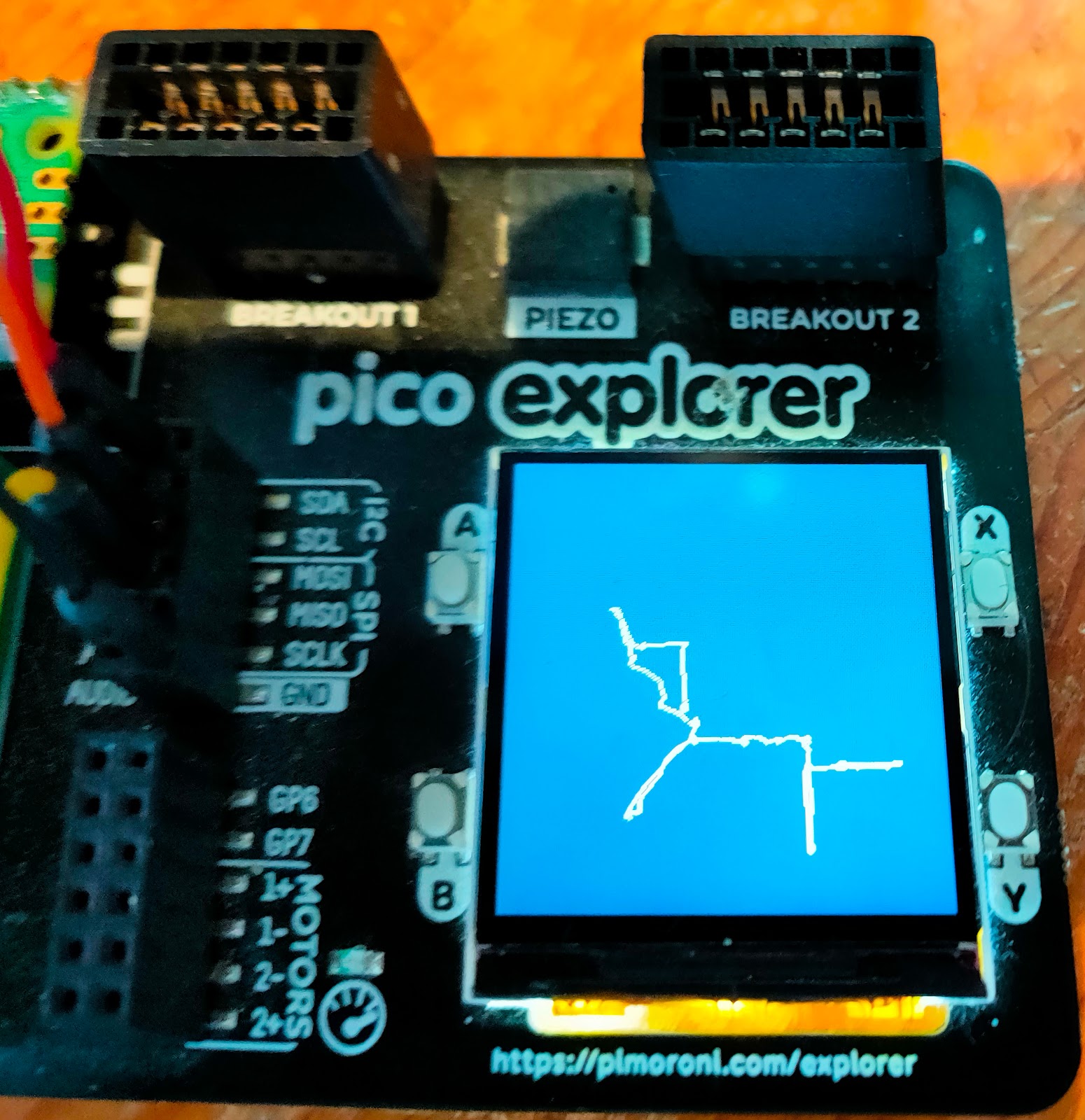
Would you like to draw pictures on your Pico?  A while ago I experimented with sketcher - a program for the Rasperry Pi Pico that connected to a Raspberry Pi. The Pico had two potentiometers that you could use to move a virtual pen in the Pi; the Pi ran the turtle graphics package which it used to draw the pictures. The project was fun, and I wondered how easy it would be to run a similar program that would use a display with the Pico. That potential project sat in my pending tray for ages, but I recently got an incentive to re-visit it. A new resource Pimoroni have asked me to write a booklet for their Pico Explorer Base . I've been a fan of the product since it first came out, and I'm really enjoying a chance to revisit its awesome capabilities. I decided I'd write a simple sketcher program that ran on the Pico. It uses two potentiometers to move a virtual pen up/down and left/right. The pen draws on the Explorer base display. I've now got a simple version running, a...

ChatGPT Meets de Bono: A Powerful Combo

I'm struggling to make a decision at the moment, so I've enlisted the help of ChatGPT. I am experimenting a lot with some of the new AI tools, and it's a bit like playing whack-a-mole at the moment; as soon as I get to grips with one bit of software, another appears and demands my attention. A lot of what I'm doing is based on OpenAI's ChatGPT. I'm concerned that I'll spend too much on paid services, so I am actively looking at Open Source alternatives that I could run locally. Alas, many Large Language Models (LLMs) are too resource-hungry to run on my workstation, and I've been thinking of trying out a Jetson Xavier which I'm not using at the moment. Worth the time? I know I'll need to spend a few days getting to the point where I know whether I can use it for the projects I have in mind. Should I invest the time? I decide to take a Judo approach and use ChatGPT to help me make the decision. I used a prompt that's worked well for me before ...

Finding the Best Solution with ChatGPT: A Personal Experience

When you're developing software for technically savvy users, you'll often encounter an annoying problem: users provide their preferred solution instead of their requirements. This issue is even more pronounced when you are both developer and user. In such situations, you're likely to choose the first solution that seems to meet your needs, even though there might be better alternatives. Pair programming can help, as your partner can spot what's going on and suggest other ideas. But what if you're programming on your own? That's where ChatGPT comes in handy. ChatGPT to the Rescue I've recently been working on an application that downloads interesting arXiv PDFs, and I wanted to access them remotely. I could think of a couple of ways to do that, but I decided to ask ChatGPT for advice. I used a prompt that had been helpful before: " Suggest three ways I could accomplish that, with the pros, cons, and interesting features of each approach. " I present...

Pair Programming with ChatGPT

  Earlier today I started work on a small admin project to help me organise my excessive collection of repositories on GitHub. I wanted a list of my repositories, showing the name, url, description, stars and forks. I decided to get ChatGPT to write the code for me. In the conversation that follows, you can imagine an embodied ChatBot sitting next to me as we pair program. I'm the customer, ChatGPT is the programmer. If I'm not happy with the results, I ask my pair to change the code. My part is in italics. Everything else came from ChatGPT. As you'll see, there are a couple of wrinkles I didn't anticipate, but ChatGPT fixed them. This took less time than I'd have taken to write the code, and it was much more fun. I recommend it. Here's the session. Write python to find the names of all my repositories on GitHub, My username is romilly. You can use the GitHub API to retrieve the names of all your repositories. Here is the Python code to achieve that: i...

Can ChatGPT code like a pro?

I've been experimenting with the code generation capabilities of ChatGPT, and I'm blown away. As a test of its capabilities I decided to ask it to write a generic version of some code I've used, over and over, in slightly different forms, in real applications. The Problem The code implements a Throttler - a class that wraps something that makes requests and makes sure that requests are not made too often. Lots of APIs apply rate limits to requests, and this code makes it easy to enforce those limits within your application. A coding session with ChatGPT Here'es the session I had with ChatGPT. My instructions are in italics . Everything else - code, comments, and explanations - was written by ChatGPT in response. Write Python to create an Abstract Class called Requester. It should have a single abstract method called request that takes an argument called command. Add docstring comments. Here is the Python code to create an Abstract Class called Requester with a single ...

Will ChatGPT save your job - or take it over?

Wondering whether ChatGPT will make you more effective, or do your job so well that you are no longer needed? ChatGPT is one of the new generation of AI tools. You can ask it for help and it can turn its hand to a huge range of tasks. ChatGPT as a Python coder Today I used it to write a very simple but useful computer application. The task would have taken me half an hour or so. ChatGPT did the job in a few seconds, and the code it write was well-structured, readable and well commented. So far so good - but what about other tasks? I decided to make a short video about what I'd done. (Watch this space to see it when it's ready).  I knew that my first step would be to write a script. Could I ask ChatGPT to help me do that? Sure. Here's what happened next. ChatGPT as scriptwriter Here's what I typed: Earlier today I got ChatGPT to write a simple application for me. Now I want to make a video showing the process and the result. I'd also like to explain why the automatio...

Complex Network Analysis

Image
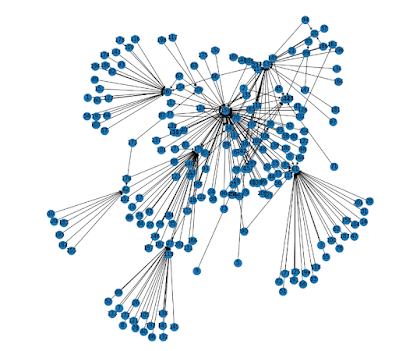
 I've recently been working on two fascinating, challenging projects. One is a guide to the Pimoroni Explorer Base. That's going to take a while, and I'll report on progress as i go. The other is a tool to help me keep track of published papers on some of the AI areas the interest me. Therese's so much published that it's a real challenge to keep up. I rely heavily on the wonderful service provided by Semantic Scholar; that helps me keep track of new papers that cite older papers that I've identified as interesting. Here's the citation  network for one of the papers that interest me: I've done quite a bit of work on networks with Python, but I've recently been reading  Complex Network Analysis in Python by Dmitry Zinoviev. It's well-written, broad in coverage, and has plenty of useful sample code. I love it. 

How to write reliable tests for Python MQTT applications

More and more IoT applications use MQTT. It's a simple and very useful messaging framework which runs on small boards like the Raspberry Pi Pico as well as systems running under Linux, MacOS and Windows. I recently decided to add some extra functionality to Lazydoro using MQTT. The code seemed to work when run manually but I had a lot of trouble getting my automated tests working. It took quite a while to understand the problem, but the fix was simple. Intermittently failing tests are bad In the end-to-end test that was causing the problem, the code simulated the start of a pomodoro session and then checked that the correct MQTT message had been  sent. The test usually failed but sometimes passed. When I manually ran a separate client that subscribed to the message stream I could see that the right messages were being sent. Intermittently failing (or passing) tests are a nuisance. They do nothing to build confidence that the application under test is working reliably, and they are ...

How can you make your Pico/Pico W project portable?

Image
In this article you'll learn how to solder the Pimoroni Lipo Shim for Raspberry Pi Pico/Pico W and use it to power your project from a single LiPo battery. You'll also discover a problem, and a solution, if you want to check the battery level remotely. Some Pico W projects need to work anywhere. Wi-Fi takes care of the connectivity, but the projects need battery power to make them truly portable. If you're building a portable project you'll find the Pimoroni Lipo Shim for Pico is a great solution. Here's how to attach and use it. Powering the Pico While you're writing the software for your Pico or Pico are you'll be using a USB cable to linking it to your host. Once your hardware and software are working you may want to free the Pico from its umbilical cord. The Pico can be powered from a battery; it's very adaptable, working off an input voltage that can range from 1.8 to 5.5 volts. The Pimoroni Lipo Shim for Pico takes advantage of t...

Raspberry Pi PicoW projects on Tom's Hardware PiCast

Image
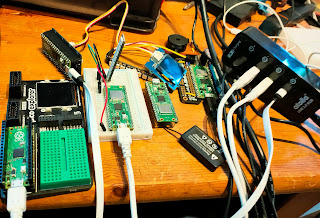
A few days ago I was asked to present some of my Raspberry Pi Pico W projects on the PiCast from Tom's Hardware . Editor Avram Piltch ( @geekinchief ) was the super-friendly host as usual, and Les Pounder ( @biglesp ) told us about his Pico W-based webserver. Raspberry Pi expert  Ash Hill  added to the fun. Ash edits Tom's hardware's monthly Best Raspberry Pi Projects feature - always worth a read. Pico W projects a-plenty I had to dig out an extra USB hub to drive all the projects I showed! Missed it? Don't worry! You can watch a recording on YouTube :