Posts

Apologies to commenters!

I've just discovered that comments  on the blog have been queuing up for moderation without my realising it. I was expecting notification when new comments were posted but that hasn't been happening. I'm now working my way through the backlog. If you've been waiting for a response, I can only apologise.

JAX and APL

Regular readers will remember that I've been  exploring JAX . It's an amazing tool for creating high-performance applications that are written in Python but can run on GPUs and TPUs. The documentation mentions the importance of thinking in JAX . You need to change your mindset to get the most out of the language, and it's not always easy to do that. Learning APL could help APL is still my most productive environment for exploring complex algorithms. I've been using it for  over 50 years. In APL, tensors are first-class objects, and the language handles big data very well indeed. To write good APL you need to learn to think in terms of composing functions that transform whole arrays. That's exactly what you need to do in JAX . I've been using JAX to implement models of spiking neural networks, and I've achieved dramatic speed gains using my local GPU. The techniques I used are based on APL patterns I learned decades ago. Try APL APL is a wonderful programming...

More fun with Spiking Neural Networks and JAX

Image
I'm currently exploring Spiking Neural Networks. SNNs (Spiking Neural Networks) try to model the brain more accurately than most of the Artificial Neural Networks used in Deep Learning. There are some SNN implementations available in TensorFlow and PyTorch but I'm keen to explore them using pure Python. I find that Python code gives me confidence in my understanding. But there's a problem. SNNs need a lot of computing power. Even if I use numpy, large-scale simulations can run slowly. Spike generation - code below So I'm using JAX. JAX code runs in a traditional Python environment. JAX has array processing modules that are closely based on numpy's syntax. It also has a JIT (Just-in-time) compiler that lets you transparently deploy your code to GPUs. Jitting imposes some minor restrictions on your code but it leads to dramatic speed-ups. JAX and robotics As I mentioned in an earlier post, you can run JAX on NVIDIA's Jetson family. You get excellent performance on...

Installing Jax on the Jetson Nano

Image
Yesterday I got Jax running on a Jetson Nano. There's been some online interest and I promised to describe the installation. I'll cover the process below but first I'll briefly explain What's Jax, and why do I want it? tldr: The cool kids have moved from Tensorflow to Jax.   If you're interested in AI and Artificial Neural Networks (ANNs) you'll have heard of Google's TensorFlow. Tensorflow with Keras makes it easy to build an ANNs from standard software components train the network test it and deploy it into production Even better: TensorFlow can take advantage of a GPU or TPU if they are available, which allows a dramatic speedup of the training process. That's a big deal because training a complex network from scratch might take weeks of computer time. However , I find it hard to get TensorFlow and its competitors to use novel network architectures.  I am currently exploring types of  network that I can't implement easily in TensorFlow. I could c...

MicroPlot on the PyPortal - progress and frustration

Image
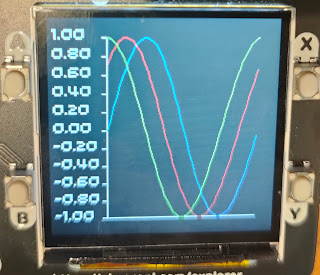
Update: I got a fix within minutes of posing the problem on the Adafruit discord channel! Here's the correct bitmap: The problem is now solved, MicroPlot now runs well on the Adafruit PyPortal and  Clue as well as the Pimoroni Pico Explorer base, but I've been tearing my hair out trying to solve a problem saving bitmaps. The bitmap problem Here's a screenshot of a display on the PyPortal together with the bitmap file which should show what's on the screen. I could not work out what's going wrong. The code creates the plot and then uses the screenshot code that Adafruit provides. import math from plotter import Plotter from plots import LinePlot import board import digitalio import busio import adafruit_sdcard import storage from adafruit_bitmapsaver import save_pixels def plot(): sines = list(math.sin(math.radians(x)) for x in range(0, 361, 4)) lineplot = LinePlot([sines],'MicroPlot line') plotter = Plotter() lineplot.p...

More Raspberry Pi Pico experiments

Image
If you're exploring the Raspberry Pi pico, here are some more resources MicroPlot I've started a new project called MicroPlot. It's been developed on the Pico though it will eventually work on other  micro-controllers and computers. It's a minimal plotting package and it already has enough functionality to be useful. It will plot simple line plots; the first example below is a series if sine waves and the second shows the voltage across a capacitor as it charges and discharges. Plotting Sine waves Capacitor charging and discharging MicroPlot has its own project on GitHub. You can read about it and download the code at https://github.com/romilly/microplot and I will be soon be using it for some more electronics experiments. Using the UART The current MicroPython documenation for the Raspberry Pi Pico is a bit thin on detail about using the UART. I've added a short example in my pico-code project on GitHub. The Tiny2040 is available from Pimoroni! Pimoroni Tiny2040 I...

MicroPython development on the Raspberry Pi Pico

Get Started with MicroPython on Raspberry Pi Pico  suggests that you use the Thonny editor for development. Thonny will get you off to a quick start, but you may have an alternative editor you'd prefer to use. Lots of my friends now use VS Code; some are vim or emacs experts; many, like me, use PyCharm as their normal Python development environment. I find it more comfortable to use my normal editor for MicroPython development, but I have more compelling reasons. The first is refactoring support. I'm learning as I go, and I often want to improve the design of my code libraries as I come to understand things better. PyCharm does a very good job of refactoring Python code. There's another issue to do with version control. I'm currently sharing my Pico code on GitHub. That means I need to keep code on the Pico in sync with the code on my workstation. I haven't found an easy way to do that with Thonny, so I am using another tool to move and test code. rshell was my fi...